ram
Fix
Process Blocker Is A Brick Wall For Unwanted Windows Processes
12:00AM Kevin Purdy | GoogleUpdate, ctfmon, iPodService—these rascally, auto-starting services and others like them can drive a memory-sensitive Windows user bonkers. Process Blocker does what it sounds like, with a DIY but simple method of choosing targets. As noted in the instructions, Process Blocker runs as a system service, watching for certain processes and killing them off if it finds them running. The app won’t provide you a list of background services or apps for selection, though—this is a text affair. If you look in your Task Manager (Control-Shift-Escape), or your super-charged Process Explorer replacement, and notice that, for instance, GoogleUpdate.exe refuses to stop starting up, even after you’ve told it not to do so with Revo Uninstaller or another app, simply add it to the list.txt file included in Process Blocker’s program folder. More detailed instructions on adding and re-starting the service are at the program site. You’ll know it’s working if you see a system tray pop-up noting that “SuchAndSuch.exe is blocked” when it tries to jump in and drink up a little memory. You’ll definitely want to make sure the processes you’re trying to block can and should be blocked off, so making a few trips to Process Library wouldn’t be a bad idea. And if you just want to throttle back an auto-starting app’s memory use, not kill it entirely, try the previously mentioned Process Lasso, or dig through our guide to reclaiming memory by mastering Windows Task Manager. Process Blocker is a free download for 32- and 64-bit Windows systems (2000 and later). Process Blocker for Windows [via gHacks] More »
Fix
Minimem Reduces the Memory Footprint of Unwieldy Applications
4:00AM Adam Pash | Windows only: Free application Minimem reduces the memory usage of individual running applications on demand. Similar applications which promise to make your computer run faster by freeing up RAM are a dime a dozen, and many of them aren’t all they’re cracked up to be. After giving Minimen a try on my PC and reading FreewareGenius’s detailed review (along with the author’s comments on that post), Minimem appears to be the real deal under the right circumstances. Minimem removes unnecessary memory pages from running processes you tell it to optimise. The program isn’t the most useful for applications that already have great memory management of their own, but it seems to work well on many applications—both small and large—that have a larger footprint than they should. More »
TweakRAM Memory Optimiser Free Today Only
5:00AM Gina Trapani | Windows only: Instead of dropping cash on a new stick of RAM for that old computer, go grab a free licence for the normally $20 memory manager TweakRAM—today only. TweakRAM speeds up your machine by optimising Windows memory management, and when your computer slows to a crawl, you can use TweakRAM to manually free up memory. The developers say: More »
Reclaim Memory by Mastering Windows’ Task Manager
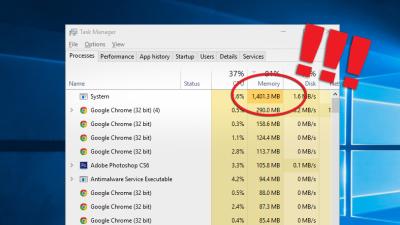
4:00AM Kevin Purdy | The best way to speed up your PC is to give it more available memory—but freeing up as much of the memory you already have is cheaper and easier than cracking open your case to install a new stick of RAM. It takes a lot of memory to get a modern Windows system up and … well, not doing anything in particular, really. Between cryptic system processes, confusing “helper” applications, and background utilities, a whole lot of who-knows-what gobbles up memory and slows down your work. While a lot of programs claim to optimse memory use and pare down processes, Windows’ built-in Task Manager can do the job just fine, given the right tools and know-how. Today you’ll extend and empower Windows’ Task Manager to speed up your system by cutting out unnecessary memory hogs. More »