flowcharts
Money
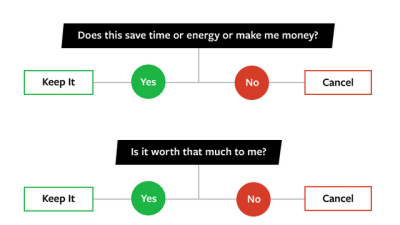
“Should I Buy It?” Flowchart Helps You Make Smarter Purchases
3:30AM Adam Pash | Advertisers would have us believe that we need a lot of things that we really only want, and that brand names are always better. This simple purchasing flowchart walks you through your purchasing decision-making process to help you make the smart choice. More »
Design
Creately Makes Group-Edited Charts And Illustrations Easy
9:30PM Kevin Purdy | If you’re looking to plan out a project, share code design or craft a funny flowchart for friends or coworkers, Creately is a free webapp that offers a no-software tool with a nice and easy learning curve. More »
Design
Lovely Charts Creates Polished Diagrams
3:00AM Jason Fitzpatrick | Lovely Charts is a free web-based tool for creating flow charts, site maps, network diagrams, and other visualisations with a drag-and-drop interface and a look somewhat upscale from black-line boxes and polygonal boxes. You’ll be zipping through charts after a few minutes familiarising yourself with the layout of the tools—I made the basic network diagram above within the first minute I was on the site. You can customise nearly everything: icon size, labels, the size and shape of the connections between the icons, and so on. One feature that’s missing, but in the works, is the ability to upload your own icons and artwork. Good thing, too, since my network map won’t be complete until I can add a little Xbox icon. You can export your charts as JPEG or PNG files at the size you specify. Lovely Charts has free and professional accounts, the primary difference between the two being that free accounts are restricted to saving a single chart. You can create and export as many charts as you want, but are restricted to saving one chart for future editing. If you need the ability to edit and save multiple charts but would like to avoid paying for a service, take a look at previously reviewed open-source application Dia. Lovely Charts [via Tech Crunch] More »
Design
Flowchart Decides Which Chart Style Is Best For Your Data
11:30PM Jason Fitzpatrick | Great data deserves an eye-catching presentation, but most charting and graph-making software offers an overwhelming array of options. Andrew at the Extreme Presentation Method blog offers a flowchart to pick the wisest choice. Andrew’s flowchart, available as a JPEG or PDF, starts with the question “What would you like to show?”—comparison, distribution, composition, or relationship—and drills down from there based on how much and what type of data you’ve got to show. Engineers and other Excel wizards probably have this knowledge hard-coded in their mouse fingers, but it’s still a great reference tool for them or anyone looking to show a lot of data and not have it all look the same. For a similar chart-picking tool, check out the previously mentioned Excel plug-in Chart Advisor. Choosing a Good Chart [via Digital Inspiration] More »
Design
LucidChart Makes Stripped-Down Flowcharts For Free
12:00AM Kevin Purdy | Flowcharts are supposed to be a combination of words and line drawings anyone can grasp, but some software solutions get far too complex with them. LucidChart, an online flowchart creator that offers a free plan with 5MB of online storage, gets back to black-ink/white-background basics. The standard process/decision/input/etc. inputs are in a left-hand toolbar, the diagram background is graph-lined paper, and it works fairly snappy on most browsers. There are custom images for certain fields, and you can upload custom images if you’d like. But for those who just want a clean and easy PDF, screengrab, or print-out, LucidChart’s basic tools are best. LucidChart has a free plan that requires a sign-up. LucidChart [via MakeUseOf.com] More »
Design