utorrent

Fix

Fix uTorrent (And Other Application) Quirks In Windows 7

6:30AM Whitson Gordon | If you’re having issues with the popular BitTorrent application uTorrent in Windows 7, such as memory overusage, downloads stopping at 99.9 per cent or false reports, weblog AddictiveTips offers some tips to get your downloads back on track. More »
Work

uTorrent Portable Puts BitTorrent On A USB Drive

1:00AM Kevin Purdy | Windows (Portable): You’ve always been able to grab uTorrent’s program folder and drop it onto a thumb drive for portable BitTorrent handling. Now the PortableApps.com suite has packaged our favourite torrent client and integrated it with their application menu. More »
Work

uTorrent 2.0 Beta Brings Fixes And Improvements, Adds UDP Support

9:30AM Adam Pash | Windows only: uTorrent, the most popular BitTorrent client on the planet, has released a new 2.0 beta complete with bug fixes and new features, including UDP tracker support. More »
Work

The Pirate Bay Adds Personal RSS Feeds For Remote BitTorrent Downloads

9:00AM Adam Pash | We’re all about ways you can start BitTorrent downloads on your home computer no matter where you are, and now popular BitTorrent site The Pirate Bay adds one more way: personal RSS feeds. If you’re adventurous enough to sign up for an account at The Pirate Bay, just head to your settings page and find the URL for your personal feed. You should be able to add that feed to your BitTorrent client of choice with RSS support, and it will automatically download every new item you add via the web interface—from any computer. It’s not bad if you’re nuts for The Pirate Bay, but for a similarly simple solution that will work with any torrent site, check out how to start BitTorrent downloads at home from any computer with Dropbox. Personal RSS [The Pirate Bay Blog via TorrentFreak] More »
Work

Start BitTorrent Downloads At Home From Any Computer With Dropbox

3:30AM Adam Pash | Blogger Guillermo Esteves loves his BitTorrent, so when he’s away from his home computer, he still wants to start up any download at a moment’s notice. His solution: Use file-syncing application Dropbox to sync torrents between computers. Assuming you’ve got Dropbox installed on your home computer and work computer, for example, you can download a torrent, save it to your Dropbox folder, and let Dropbox sync that new torrent to your home computer. Using the folder monitoring feature available in most popular BitTorrent applications (including uTorrent for Windows/Mac and Transmission for Mac/Linux), your BitTorrent app of choice can monitor your Dropbox folder for new torrent files and automatically open them when they appear. In practice, that translates to dead simple, instant remote BitTorrent downloads, which we like very much. You can also upload torrent files to Dropbox from the Dropbox web interface, so you could even do this from a computer where you can’t install Dropbox. This isn’t the only remote BitTorrent method out there, but it’s certainly a good (and easy to implement) one. Start BitTorrent downloads remotely with Dropbox [Guillermo Esteves] More »
Work

Tweak uTorrent’s Settings For Faster Downloads

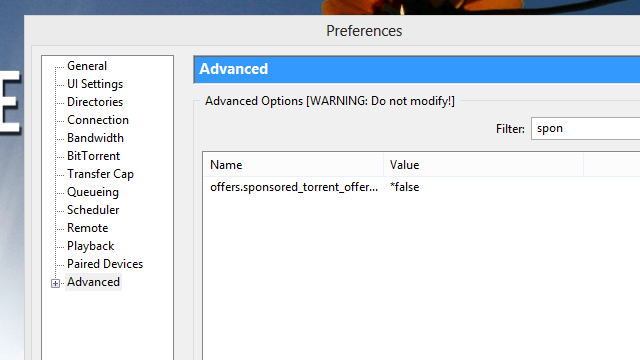
9:00PM Kevin Purdy | Aside from having a really fast, non-filtered broadband connection, there are a few ways you can speed up your BitTorrent downloads through simple tweaks. The MakeUseOf blog runs down a few of them. The MakeUseOf poster prefers Windows client uTorrent for its manageability and efficiencty—as do we, and our readers—but most of their tricks can be tackled in any torrent grabber. The list starts out with the obvious stuff, like choosing healthy seeds with lots of peers, and gets down into the nitty gritty, like increasing Windows’ allowance of “Max Half Open TCP connections” through a third-party patch: After running the patch, you have to set the number of connections in your torrent client. For example, in uTorrent go to Options – Preferences – Advanced – net.max_halfopen. Set any number from 50 to 100. But see that net.max_halfopen is set lower than the value set in TCPIP.SYS. Always check if it is still patched because Windows updates sometimes overwrite it. 10 Ways To Speed Up Torrent Downloads [MakeUseOf.com via The Red Ferret Journal] More »
Work

uTorrent For Mac Officially Released

1:48PM Adam Pash | Mac OS X only: If you’ve been waiting patiently for the popular BitTorrent application, uTorrent, to find its way to your Mac, your wait is finally over: uTorrent for the Mac is officially available. We’ve been waiting for the Mac release for a while now, and leaks of the beta had already made their rounds on BitTorrent sites (how apropos), but the official release (Intel Macs only at the moment) of the most popular BitTorrent client is finally here. The download is still in beta, and the developers acknowledge that it “may contain serious bugs,” but it still looks and feels great. More »
Work

uTorrent Updates to 1.8, Mac Release Looming

6:00AM Adam Pash | Popular BitTorrent client uTorrent has released its first stable update since January: uTorrent 1.8. The changelog is huge, but the main improvements are better Vista support and IPv6 support (the latter means better connectivity and download performance). With the 1.8 release complete, the uTorrent team will be focusing more resources toward developing a long-awaited Mac version, according to TorrentFreak. More »

BitTorrent for Your iPhone and iPod Touch… Sort of

8:00AM Adam Pash | Windows only: Bring BitTorrent to your iPhone or iPod touch through the iPhone Web Interface for uTorrent. In a nutshell, the mobile-Safari-optimised interface provides remote control access for your desktop installation of uTorrent–so it’s really just a mobile version of uTorrent’s web interface. In fact, you can set it up by following the same instructions for running the uTorrent WebUI and then placing the iPhone interface folder inside the WebUI zip and navigating to http://YourIPAddress:YourBTPort/gui/iphone/i.html (more detailed instructions on the download site). uTorrent is currently Windows only (though a Mac version has been promised in the future), so for the time being you’ll only be able to set up iPhone/iPod touch access on a Windows box. iPhone Web Interface for µTorrent [DavidRaso via TorrentFreak] More »