context menu
Work
Add Open File Location To The XP Context Menu
4:00AM The How-To Geek | The Tweaking with Vishal web site writes up a quick but useful registry hack that adds an “Open File Location” item to the context menu, just like Windows 7 or Vista has already. More »
Fix
Add Delete Folder Contents To The Windows Context Menu
6:30AM Lifehacker US Edition | The WinVistaClub forum walks through a simple registry hack to empty a folder right from the Windows context menu—a time saving tweak for cleaning up your clutter. To apply the registry hack, you can create a new file in Notepad, paste in the contents of this registry hack, save the file with a .reg extension, and then double-click the saved file to enter the information into the registry. Once you’ve completed these steps, the new item will be available on the context menu—no need to reboot. Windows Registry Editor Version 5.00 [HKEY_CLASSES_ROOT\Directory\shell\Delete Folder Contents] [HKEY_CLASSES_ROOT\Directory\shell\Delete Folder Contents\command] @=”cmd /c \”cd /d %1 && del /s /q *.*” If you’d rather use the point-and-click method, you can follow the instructions at the linked article—or check out our top 10 right-click tools. Add “Delete Folder Contents” to Right Click Context Menu [WinVistaClub] More »
Fix
WinFlog Extreme Toggles Aero And More Via Right-Click
9:28AM Adam Pash | Windows only: Free application WinFlog Extreme adds several handy shortcuts to your right-click context menus with a Vista-specific twist. For example, with WinFlog you can toggle Aero with a quick couple of clicks, turn on Flip 3D, or perform more basic operations like turning off your monitor or ejecting your disc tray. Although the app is very Vista-specific, it does work on XP—but it’s not like you’ve got any Aero interface to toggle in the first place. For Vista users, the option to quickly toggle Aero is a great feature when you’re looking to squeeze every last ounce of performance out of your PC. WinFlog Extreme is a free download, Windows only. WinFlog Extreme [via Download Squad] More »
Fix
How To Declutter Your Windows Context Menu
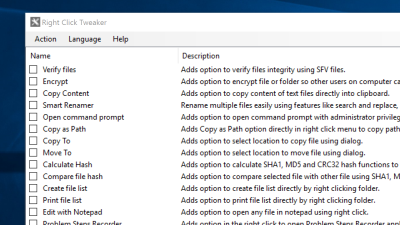
4:30AM Adam Pash | Windows tip: Whether you use them or not, many applications install superfluous entries to your Windows right-click context menu resulting in a cluttered mess. The How-To Geek weblog details how to clean up your messy Windows context menu using a variety of methods, from manual registry hacks to using the simple, previously mentioned ShellExView. If you steer clear of the right-click because it’s become such a cluttered mess, do yourself a favour by cleaning it and customising it to fit your needs. How to Clean Up Your Messy Windows Context Menu [the How-To Geek] More »
Extend Your Right-Click Menu with FinderPop
10:00AM Adam Pash | Mac OS X only: Freeware application FinderPop adds tonnes of new and useful functionality to your Mac’s context menus through a highly configurable preference pane. FinderPop’s main goal is to make it quick and painless to navigate, copy, move, and alias files across your filesystem through the context menu, but it does much more than that . Unfortunately FinderPop is an app that takes a little time to get your head around, but it’s also an app that you could imagine being blown away by if you were watching someone who was really good with it. FinderPop is freeware, Mac OS X only. FinderPop [via Cool OSX Apps] More »