Disk Space

Organise

Free Up Disk Space By Deleting Files In The Hidden Dropbox Cache Folder

2:30AM June 11, 2011 | Melanie Pinola

Inside your Dropbox folder is a hidden cache folder that stores deleted files locally on your computer for faster restores. If you use Dropbox a lot, this cache folder can eat up valuable HD space. Here’s how to erase those files. More »


FixBrought to you by

Empty iLife’s Trashes To Free Up Space On Your Mac

1:30AM December 30, 2010 | Whitson Gordon

We’ve shown you a few ways to clean up your Mac’s hard drive, but Macworld reminds us of a very simple tip that many of us probably forget about often: empty the trash in your favourite iLife apps. More »


Work

GetFoldersize Analyses Disk Usage Sans Flashy Eye Candy

8:30PM May 26, 2010 | Jason Fitzpatrick

Windows: If you just want to do a folder size analysis without all the radial graphs and eye candy that many popular folder scanners sport, GetFoldersize gives you the information you need in a simple and straightforward interface. More »


Work

Force Snow Leopard To Report Hard Drive Capacity In Base 2

7:00AM September 26, 2009 | Adam Pash

A lot of people were upset when they found out Snow Leopard was reporting hard drive capacity “correctly” in base 10; if you were one of them, here’s how you can fix it. More »


Work

Snow Leopard Reports Hard Drive Capacity Correctly (In Base 10)

9:30PM August 31, 2009 | Gina Trapani

ZDNet reports that Snow Leopard has changed the way it calculates disk capacity from earlier versions of OS X: now it’s actually accurate, and you can better judge when a disk is really, actually full. More »


Work

Fast Duplicate File Finder Finds Your File Dupes

11:30PM June 17, 2009 | Jason Fitzpatrick

Windows only: A little sloppy file keeping can lead to a lot of duplicate and space-hogging files. Dig up all the dupes with speedy Fast Duplicate File Finder. More »


Organise

Primitive File Size Chart Quickly Locates Your Drive-Hogging Files

7:00AM March 29, 2009 | Jason Fitzpatrick

Windows only: If you’re looking to quickly get a snapshot of which folders and files are eating up your disk space, Primitive File Size Chart can help. We’ve covered other tools that help you see where your disk space is going, but it’s tough to beat the portable application Primitive File Size Chart for speed. You point it at a disk or directory, tell it how many files and folders you want listed, and it takes care of the rest. Results were returned within seconds even when scanning a packed 1TB disk. Primitive File Size Chart doesn’t have any fancy bells or whistles but it will give you the path, file name, and size of your largest files making short work out of assessing what is filling up your disks. Primitive File Size Chart is freeware, Windows only.

Primitive File Size Chart [Freeware Home]

More »


Work

SpaceMonger Visualises Hard Drive Usage

4:00AM February 6, 2009 | Lifehacker US Edition

Windows only: Free space analysis utility SpaceMonger visualises hard drive usage with a drill-down treemap view of your file system so you can quickly identify wasted space. Using the application is easy—launch the executable, pick a drive to analyse, and then drill down through the treemap to identify the files that are wasting space. If this concept seems familiar to you, it’s because we’ve featured many of these applications before. Previously mentioned apps like DriveSpacio, Windirstat, and Free Disk Analyzer all do the same thing with slightly different interfaces. This application is lightweight and contained in a single executable file, making it worth a look as another addition to your flash drive toolkit. SpaceMonger 1.4 is a free download for Windows only. The latest version isn’t free, but you can still download the freeware version from their downloads page. Thanks, Nik Coley!

SpaceMonger

More »


Work

Free Disk Analyzer Finds The Largest Space-Wasting Files

10:30AM February 5, 2009 | Lifehacker US Edition

Windows only: File space usage application Free Disk Analyzer quickly and easily finds the largest files that are wasting space on your drive. Once installed, you can locate the largest files by selecting a drive on the left-hand side, and then choosing the Largest Files tab on the bottom, which sorts by file size regardless of the directory they are located so you can quickly identify files for deletion. Hidden behind the options panel you will find some even better settings—the ability to filter by file type, or only analyse files larger than a specified size, making this a great utility for cleaning up your drive. Free Disk Analyzer is a free download for Windows users only. For a similar utility with more eye-candy, take a look at previously mentioned DriveSpacio.

Free Disk Analyzer [via Freewaregenius]

More »


FixBrought to you by

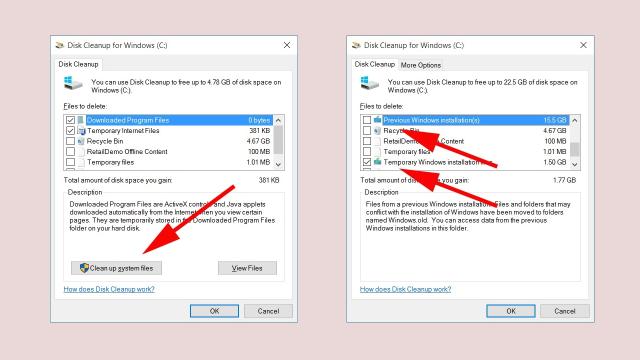
Run Disk Cleanup Automatically At Startup

4:00AM January 31, 2009 | Lifehacker US Edition

The CyberNet tech blog details how to create a set-it-and-forget-it scheduled task to automatically run Disk Cleanup every time your computer starts. The setup requires a few steps, starting with running Disk Cleanup from the command line with the /sageset:1 parameter to choose your settings, and then creating a scheduled task with the /sagerun:1 option to automatically run using the saved settings every time you start your computer. If you’d prefer to use the reader favourite CCleaner to clean up your computer, we’ve already detailed how to run CCleaner silently with a shortcut, or run it automatically with a scheduled task, which could be adjusted to run on startup.

Automatically Empty the Recycling Bin at Startup [CyberNet]

More »