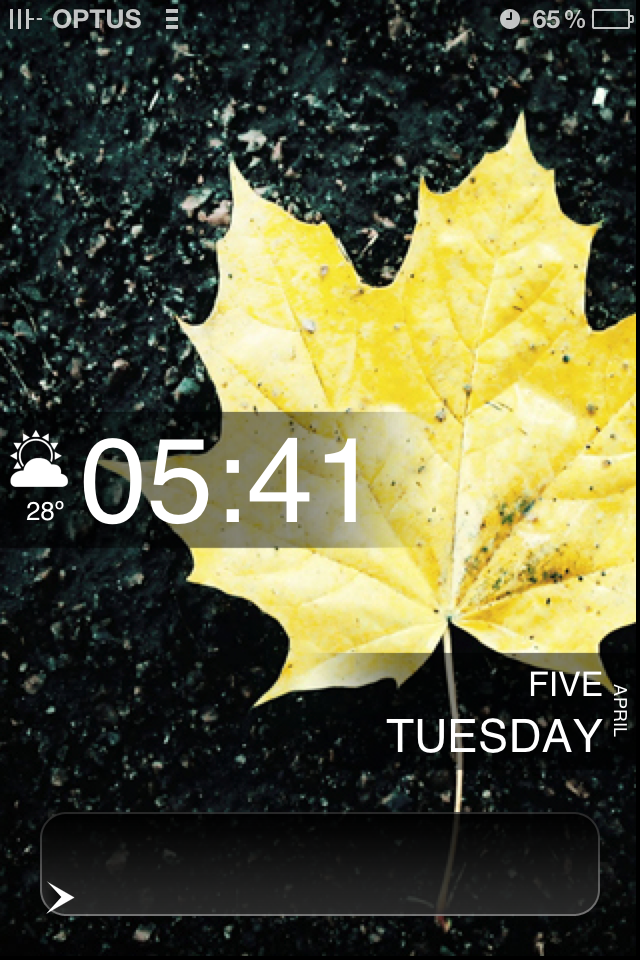
There are a lot of one-click themes already available on Cydia (the jailbreaker’s App Store), but they’re not always perfect. Today we’ll be loading up a sleek, easily customisable lockscreen that gives you the date, the time, and the weather in a stylish format. When you’ve finished, you’ll have a lockscreen like in the image above (which you can also customise if you wish).
Before You Start, You’ll Need…
- A jailbroken iPhone
- iPhone Explorer or some variantion
- Cydia (should install when you jailbreak your phone)
- From Cydia, you’ll also need to install:
- Lockscreen Clock Hide
- Winterboard
- CleanStatus
Step 1
Download the theme appropriate for your current version of iOS.

Step 2
Unzip the download and locate LockBackground.html. Open this with your plain-text editor of choice (Notepad/TextEdit will do), find “var locale: Los Angeles, California,” and input your own location. This will give you the weather for your area. Save and close.
Step 3
Open up iPhoneExplorer and navigate to Root/Library/Themes.Step 4
Copy the entire unzipped theme folder into your “Themes” folder.Step 5

Open up your Settings on your iPhone and go to Clock Hide. Enable Clock Hide. As the name suggests, this will hide the default clock on the lockscreen.Step 6

Go to CleanStatus. Enable CleanStatus. Turn “on” Carrier Name and anything else you want to hide in your status bar.Step 7

Go to Winterboard. Go to Select Themes. Select the theme we just set up.Step 8

Go back to Winterboard. Respring.
Ta-da! You will now have a customised lockscreen on your iPhone! It should look something like the image to the left. If you’d like to change the wallpaper for the lockscreen background, just overwrite the background.jpg with your wallpaper of choice in the theme folder.Sources & Other Starter Themes
This is a basic starting point, but you can continue customising beyond this to fit your needs. For more resources, check out:If you’re a veteran iOS customiser, let’s hear what apps and hacks you turn to when you want to bend iOS to your whim in the comments.


Chris
Saturday, February 19, 2011 at 9:10 AMWorks great for me. Only issue is how do I customise to use Celsius?
Paul
Saturday, February 19, 2011 at 11:44 AMTo change to Celsius in about 4 lines below where you enter your location, “var isCelsius = false” change this to true. :)
luker
Saturday, February 19, 2011 at 11:53 AMsearch for “celsius” in the html file you changed your hometown. change the setting from false to true. true.
luker
Saturday, February 19, 2011 at 11:55 AMLove this theme btw. perfect. thank you.
Now if only, by holding the weather or date as you slide to unlock it brought you straight to those apps…..
Dilpreet
Saturday, February 19, 2011 at 11:24 PMHow do i change the weather to canberra, australia?
because going canberra, ACT doesn’t work
olearymo
Sunday, February 20, 2011 at 2:01 PMTHIS is the stuff that tempts me to go ios…
tempting. If only it wasn’t so actively fought-against by Apple.
Gordon
Sunday, February 20, 2011 at 10:13 PMLockinfo from Cydia is what I use for my lockscreen. It has upcoming calendar events, alerts and emails, even weather. Found a nice HTC-like plugin for it too, to make it look that little bit nicer.
It costs a little money, but it’s worth it.
damo
Monday, February 21, 2011 at 3:38 PMLockinfo continually crashes for me.
Stewart Ralph
Tuesday, February 22, 2011 at 12:48 PMDilpreet – I got Sydney to work by changing the location to ‘Sydney, Australia’ (as that’s how it was listed on the Accuweather.com site, where the theme gets its info from)
Evan
Tuesday, March 8, 2011 at 5:49 PMHey thanks for this awesome tutorial
manda
Monday, April 4, 2011 at 4:03 AMI can’t copy the unzipped theme file to iPhone Explorer. Or at least, it won’t let me.
Matthew Lee
Tuesday, April 5, 2011 at 6:29 PMI’m having this problem, I was wondering if anyone could help me get rid of that ugly slider bar container thing please.
http://i96.photobucket.com/albums/l170/ragnarok_ml/IMG_1351.png
Simon Gallasch
Tuesday, April 12, 2011 at 1:30 AMI am having the the same problem. using ios 4.3.1. other than that, it works fine.
Simon Gallasch
Tuesday, April 12, 2011 at 1:50 AMok i found the solution in the LS Nimbus Deviant Art Comments:
“~omma2289 5 days ago
I found the solution for the slider bar problem.
-Open the theme folder.
-Go to “LS Nimbus/Bundles/com.apple.TelephonyUI” (here’s where the lockscreen icons are stored)
-Here you need to add 3 clear (transparent) png images with exactly the following names (case-sensitive):
WellLock.png
WellLock@2x.png
WellLock_T.png
For this you can copy-paste 3 times any of the background images already in that folder like “bottombarbkgnd.png” and then rename each copy
-Once you have those images respring or restart your device and the slide bar shouldn’t be visible anymore.”
jot
Tuesday, April 5, 2011 at 11:55 PMDoes anyone know if the iOS 4.2.1 theme will work with iOS 4.3.1?
Has anyone tried?
hdc4
Wednesday, June 1, 2011 at 9:25 PMThis works with 4.3.3. But in my experience, the background picture size must be 480×320 NOT 960×640 even on iPhone4.
Thanks Simon, that fix works wonderful.. (but just search around for com.apple.TelephonyUI, it was in some other folder).
Good job lifehacker for putting this nice lockscreen mod up!
Dean
Thursday, June 23, 2011 at 7:11 PMIs there any way to change the signal bar and wireless bar icons?
Ian
Wednesday, July 6, 2011 at 8:32 PMDoes anyone know how to make the time display in 24 hours?
Patrick
Wednesday, January 18, 2012 at 10:53 PMEverything works absolutely fine, easy instructions. Except, my old slider remains and the wi-fi and service icons haven’t changed. Any ideas?